How Refio manages conversation context, or how to fit a big project into limited AI memory
AI models can do a lot these days. They can analyze code, write documentation, hunt for bugs, suggest refactoring, explain how a system works, and even help with planning architecture. The catch is that even a really good model doesn’t get a “magic view” of the whole project all at once.
And that’s where things get tricky.
Because on one side you’ve got repositories with hundreds or thousands of files, documentation, conversation history, command output, logs, configs, dependencies and business context. And on the other side you’ve got a model that can only process a certain amount of text in a single pass. It doesn’t matter whether we’re talking about a small local model or a big cloud one – there’s always some limit.
This isn’t a bug. It’s just how models work.
So the question is: how do you make sure the AI has exactly what it needs in front of it at any given moment, without drowning it in a ton of irrelevant data?
How Refio solves this:
The core problem: the AI doesn’t see the whole world at once
The simplest way to picture it is to think of a really good consultant.
Imagine a person who’s fast, sharp and understands complex things well, but has limited working memory. You can’t dump the company’s entire archive on their desk, because they’ll simply drown in it. You have to hand them the right documents, at the right moment, in the right form.
It’s exactly the same with AI models. The model doesn’t “know the project” the way a person does after sitting with it for half a year. The model only knows what it just got in its context. If it didn’t get an important piece of code, it won’t take it into account. If it got too much junk, it might lose track of what matters most. If the conversation is long and the history wasn’t well organized, it’ll start losing the thread.
That’s why the effectiveness of AI working on a bigger project depends not only on the model itself, but on how you manage the context.
And that’s exactly where Refio comes in.
Refio doesn’t dump everything into the model A lot of people’s first instinct is simple: “well, let’s just send the whole project to the AI”.
Sounds logical, but in practice it’s a poor idea.
First, big projects blow past the available context window very quickly. Second, even if you technically could cram a huge amount of content in there, the model doesn’t make good use of data thrown in chaotically. Third, the cost of that approach gets needlessly high – both in time and in compute.
A selective approach works much better. So instead of loading everything, you feed in only what has the most value at that particular moment. But for that to work well, you need a sensible system for organizing knowledge about the project.
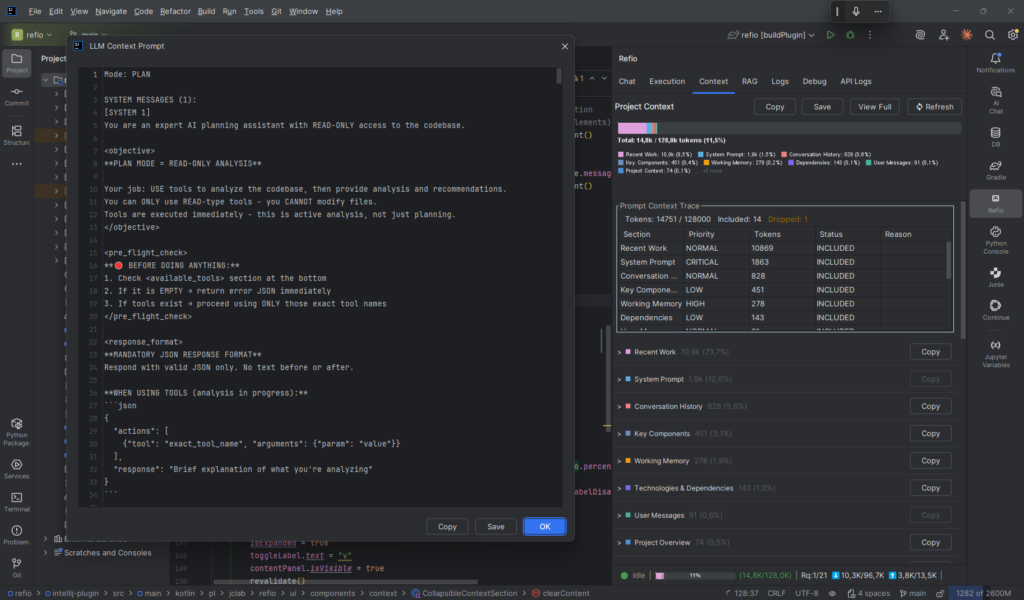
Three layers of context
The whole mechanism can be understood as working across three layers of information.
1. The static layer
This is the set of things the model should know pretty much all the time.
That can include:
- project rules,
- a description of the repository structure,
- information about available tools,
- how operations are carried out,
- security rules,
- important architectural instructions,
- agreed-upon working style.
It’s a bit like the project’s manual pinned to the wall. It doesn’t change every minute, but it’s good to have it always within reach.
If the AI has, say, tools for reading files, semantic search, running commands or editing code, then it should understand what those tools are, when to use them, and what to expect from them. Without that it starts behaving less predictably.
2. The working layer
This is the working memory built up over the course of the whole session.
The model reads files, looks into classes, analyzes dependencies, runs commands, checks results, compares chunks of code. If you tried to keep the full output of all those operations, the context would clog up in no time.
That’s why Refio doesn’t store everything 1:1.
Instead of the full content, it builds up a condensed memory of facts. So it doesn’t have to remember an entire file that’s 500 or 1000 lines long. It’s enough to note down things like:
- the
AuthServicefile handles user login, - it uses
JwtProvider, - token validation happens in the middleware,
- the config dependency is pulled from
SecurityConfig, - a token refresh method was found in the file,
- there’s a link to the permissions module.
This works a bit like the notes a person takes while going through documentation. You don’t copy everything word for word, you just write down what’ll matter later.
And this is really important, because that kind of working memory lets the AI build up a sense of the project without having to keep going back to the same sources over and over.
3. The momentary layer
This is the layer assembled from scratch for every new response.
Here’s what goes in:
- the user’s current question,
- the latest messages from the conversation,
- the most recent operation results,
- code snippets picked out by semantic search,
- any extra data needed to carry out a specific step.
This is the layer responsible for keeping the model “here and now”. So that instead of pondering everything at once, it focuses on the current task.
In practice it’s a bit like the documents spread out on your desk for the case you’re working on right now. The rest of the knowledge exists in the background, but it doesn’t have to be on top of the pile the whole time.
The token budget, or memory has its own accounting too
Every model has a limited context window. Meaning: there’s a limit to how much text you can pass in as input while it’s still able to process it effectively. That limit is usually expressed in tokens. To simplify: tokens are the smaller units of text that the model “assembles” its understanding of the input from. If we’ve got a limited budget, we have to manage it sensibly. And here’s where Refio doesn’t treat all data the same. Instead, it splits the context into sections with different priorities.
Critical sections
These are the things that basically always have to be present. For example:
- system instructions,
- rules for how tools work,
- key security rules,
- basic information about the working environment.
You don’t want to drop these, because without them the model loses its foundation.
High-priority sections
This is where the things that are very important for the current work go:
- the project’s working memory,
- the most important agreements,
- business context,
- project instructions,
- data supplied by the user.
These are things that might shift a little, but still carry a lot of cognitive value.
Normal and low sections
Here’s where the elements land that are useful, but don’t always have to be present in full:
- older operations,
- search results,
- longer conversation history,
- supporting materials,
- references.
When you start running out of room, these are the sections that get trimmed first.
It’s a pretty common-sense approach, really. When your desk starts running out of space, you don’t toss out the main premises of the project and the current task. First you set aside the less important notes and the older papers.
Compression isn’t about blindly chopping
A really important point: sensible context management can’t come down to brutally cutting text every N characters. That usually ends in loss of meaning. Refio uses a more layered approach to compressing operation results. You can simplify it down to three levels.
Level 1: full result
If an operation was just carried out and the model is supposed to make its next decision based on it, then it’s good to keep the full data. Example: the AI read a security config file and is about to answer whether the authorization method can be changed. In that case the full result is needed.
Level 2: partially trimmed result
Older operations don’t always need the full content. You can keep, say, the beginning and the end of the result and skip the middle with an appropriate note. This often gives surprisingly good results, because a lot of the important information sits right at the start or the end of the output. This trick still lets you stay oriented, but it costs a lot less space.
Level 3: semantic summary
The oldest operations are best turned into a compact summary. Just not a generic one along the lines of “file checked”, because that adds nothing. A good summary should depend on the type of tool.
For example:
- for reading a file: a list of classes, functions, responsibilities and dependencies,
- for a search: the number of hits, the locations, the most important matches,
- for editing code: what was changed, in which file, and for what purpose,
- for a system command: the most important effects of running it.
So it’s not about shortening “any old way”, it’s about keeping the information that actually helps you keep the work going.
What about the conversation history?
This is another problem that shows up fast when you work with AI for longer. At the start of a conversation everything’s simple. There are a few messages, a few answers, one topic. But after a few dozen minutes, or after a longer technical session, the history starts growing very fast. If we keep everything in full form, the context starts to suffocate. If we delete everything too aggressively, the model loses the thread and starts going back to old questions or suggesting things that were already rejected. So a layered mechanism comes in handy here too.
When the conversation history crosses a certain threshold of its budget, Refio can:
- leave the most recent messages in full form,
- turn the older part into a single compact summary.
And that summary shouldn’t sound like a school book report. It should contain genuinely useful things:
- what’s already been agreed,
- which files were checked,
- what decisions were made,
- what was changed,
- what the next steps are,
- what problems remain open.
In practice this works really well. The model still understands the direction of the conversation, but it doesn’t have to read the whole history from the top.
Scaling to different models
Another thing that makes a lot of sense here is that this approach works for different classes of models.
A small local model has a much tighter budget. A big cloud model can take in much more data. But the problem of organizing context doesn’t disappear in either case.
Only the scale is different.
A small model will get:
- shorter instructions,
- more compact summaries,
- fewer search results,
- more heavily condensed working memory.
A big model can get:
- more detail,
- a broader set of hits,
- a longer history in full form,
- richer project context.
The architecture, though, stays the same.